RegError: C0 CFP:218100450 & CFP:218100455
After installing Simul8, some users might see one of the following message when opening the software:
For installation help see Simul8.com/install Startup or Shutdown of application failed, registry settings may be wrong or files missing or Windows may be very low on resources. Contact support with the following information:
Reason code = RegError: C0 [CFP:218100450] Exception: Out of system resources Build: XXXX
or
Reason code = B3 [CFP:218100455] Exception: Out of system resources Build: XXXX
These messages indicate that you need to enable some compatibility settings prior to opening the program.
To fix your settings:
- Close any instances of Simul8 you have open
- Locate your Simul8 installation directory (by default this is C:\Program Files (x86)\Simul8)
- Scroll down and right-click on the S8.exe file
- After right-clicking, select “Properties”
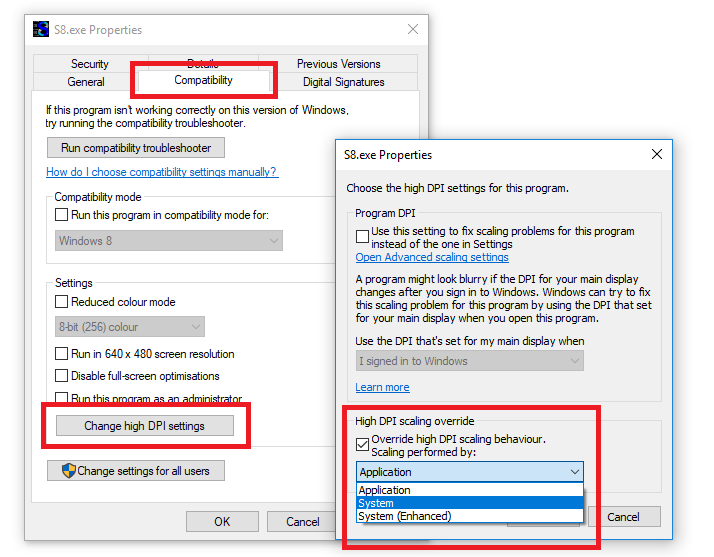
- Select the Compatibility Tab
- Click “Change high DPI settings”
- Check option for “Override high DPI scaling behavior. Scaling performed by:”
- Choose “System” from drop-down menu
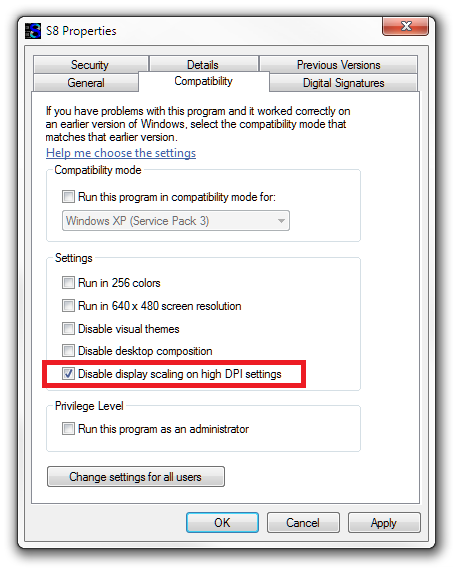
Alternatively on some older machines, your options will be:
- Check the option for “Disable display scaling on high DPI settings”
Now launch Simul8.
If the message still appears, in the same Compatibility Tab for Simul8, you can also try running it in Compatibility Mode for an older version of Windows. Ensure your screen resolution is set to 1920 × 1080, restart your machine, and run Simul8.
If the issue still persists after doing the above steps, then please email support@Simul8.com.